

Hey there, game lover! Want to play awesome games right now without downloading anything? You’re in the perfect spot! Browser games are like magic – you just click and play. No waiting, no downloading, no filling up your computer’s space. Just pure fun!
Think of browser games like watching your favorite cartoon on TV. You don’t need to download the cartoon first, right? You just turn on the TV and watch. Browser games work the same way – open your internet browser (like Chrome or Firefox) and start playing instantly!
What Makes Browser Games So Cool?
Imagine this: You’re sitting in class during a free period, or you’re at home feeling a bit bored. You want to play a game, but your mom said “no more downloading games!” Guess what? With browser games, you don’t need to download anything at all!
Here’s why kids and grown-ups everywhere love these games:
They’re Super Fast to Start Remember waiting 30 minutes to download a game? Not anymore! Browser games load in seconds. It’s like the difference between making instant noodles (2 minutes) versus cooking a full meal (1 hour). Browser games are your instant noodles – quick and satisfying!
Your Computer Stays Happy Your computer or tablet has limited space, like a backpack. If you keep stuffing more things in your backpack, it gets too heavy. Browser games don’t take up any space in your “backpack” because they live on the internet, not in your device.
Play Anywhere, Anytime School computer? ✓ Dad’s laptop? ✓ Library computer? ✓ Your tablet? ✓
As long as there’s internet and a browser, you can play. It’s like having a portable game room that follows you everywhere!
No Updates Needed Regular games keep asking you to update them. “Update available… Update available…” So annoying! Browser games update themselves automatically. You never have to click “update” – the game makers do it while you sleep.
Best Browser Games You Can Play Right Now
Let me tell you about the coolest games that thousands of kids play every single day. These aren’t boring or slow – they’re actually super fun!
Action & Adventure Games
Run 3 Imagine running through space tunnels that keep spinning around. That’s Run 3! You control a little alien who runs and jumps through crazy space tunnels. The tunnels rotate, gravity changes, and you have to be super quick. It’s like being in a sci-fi movie but you control everything. The best part? There are dozens of levels, so the fun never stops.
Fireboy and Watergirl This is perfect if you want to play with a friend sitting next to you. One person controls Fireboy (who loves lava) and the other controls Watergirl (who loves water pools). Together, you solve puzzles in ancient temples. Fireboy can’t touch water, and Watergirl can’t touch fire. You have to work as a team, like superheroes with different powers!
Geometry Dash Music meets jumping in this super addictive game. You control a square that jumps over spikes and obstacles, and everything moves to awesome music beats. It’s challenging but so satisfying when you complete a level. Warning: You might say “just one more try” about 100 times! You can learn more about why this game became so popular on gaming education sites like Common Sense Media.
Puzzle & Brain Games
2048 This game is sneaky – it looks simple but it’s actually a brain workout! You slide numbered tiles around, and when two tiles with the same number touch, they merge. Your goal? Create a tile with 2048 on it. It’s like solving a math puzzle but way more fun. Even teachers love this game because it helps with number skills!
Cut the Rope Om Nom is a cute little green monster who LOVES candy. Your job is to cut ropes at the right time so the candy swings into his mouth. Each level is like solving a physics puzzle. Sometimes you need to pop bubbles, sometimes you avoid spiders, and sometimes you use rocket power! It’s adorable and challenging at the same time.
Racing & Sports Games
Moto X3M Ever wanted to do crazy motorcycle stunts without getting hurt? This game lets you! Race through wild tracks full of ramps, loops, and even explosions. You can do backflips in the air and land perfectly for bonus time. It’s like being a stunt performer in an action movie.
Basketball Stars Play basketball against other players from around the world! Shoot three-pointers, do slam dunks, and show off your skills. The controls are simple – arrow keys to move and keys to shoot. But becoming a champion? That takes practice and skill!
Creative & Simulation Games
Minecraft Classic Yes, the famous Minecraft has a browser version! It’s the original version where you can build anything you imagine with blocks. Create castles, houses, pixel art, or even recreate your school. There’s no fighting or monsters in this version – just pure creative building fun.
Hunger Games Simulator Based on the popular books, this simulator lets you create your own Hunger Games with any characters you want. Type in your friends’ names, your favorite cartoon characters, or even your teachers (just for fun). Then watch as the simulator tells a story about what happens. It’s hilarious and different every time!
Fun Browser Games for Instant Entertainment
Sometimes you don’t want something complicated. You just want to click and have fun immediately. These games are perfect for that!
Cookie Clicker This game sounds silly – you click a cookie to make more cookies. But here’s the secret: it’s super addictive! Soon you’re buying cookie factories, grandmas who bake cookies, and even portals to other dimensions for more cookies. It’s satisfying to watch your cookie count grow bigger and bigger.
Agar.io You’re a tiny circle in a world of other circles. Eat smaller circles to grow bigger. Avoid bigger circles or they’ll eat you! It’s like being a fish in the ocean – eat smaller fish, swim away from bigger ones. Simple to learn, but you’ll want to play “just one more round” forever.
Slope Roll a ball down a neon slope that keeps getting faster and faster. The slope twists, turns, and has gaps you must jump over. Your reflexes need to be super quick! The game gets harder the longer you survive. Can you beat your high score?
Paper.io 2 Claim territory by drawing shapes on the map. But watch out! Other players can cut your trail and eliminate you. It’s like playing tag mixed with capturing territory. The satisfaction of claiming a huge area is amazing!
Free Browser Games You Can Play Without Downloading
Every single game I’ve mentioned is 100% free. You don’t need to pay a single penny. But how does that work? Let me explain!
These games make money from small ads that appear on the screen. It’s like how YouTube is free but shows ads sometimes. The ads help the game makers pay for the websites and create new games.
Here’s what “free” means:
- No credit card needed ✓
- No signup required (for most games) ✓
- No “pay to win” tricks ✓
- No time limits ✓
Some games might have a “premium” version with extra features, but the basic game is always free and fully playable. It’s like having the choice to eat a regular ice cream (free) or add extra toppings (costs money). The regular ice cream is still delicious!
Finding Trusted Free Game Sites
Stick to well-known game websites like CrazyGames, Poki, or Kongregate. These sites are safe, don’t have tricky downloads, and offer thousands of games. They’re like the YouTube of gaming – big, trusted, and popular.
Browser Games to Play with Friends Online
Playing alone is fun, but playing with friends is even better! These games let you team up or compete against your buddies.
Multiplayer Games for Team Fun
Krunker.io This is like a cartoon version of popular shooting games. You and your friends can join the same match and either work together or compete. It’s fast-paced and doesn’t take itself too seriously – perfect for laughing with friends!
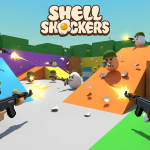
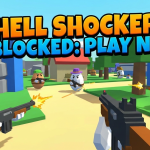
Shell Shockers Imagine eggs with guns. Yes, eggs! You’re an egg soldier fighting other egg soldiers. It sounds ridiculous because it is, and that’s why it’s so fun. Play with friends and see who the best egg warrior is!
Among Us (Browser Version) The super popular game where you work on a spaceship but some players are impostors trying to sabotage everything. You need to figure out who the impostor is before it’s too late. Play this with friends in a video call and it becomes even more exciting!
Games for Local Co-op (Same Computer)
Purpose Games These aren’t action games but educational quiz games where you can challenge your friends. Learn about world geography, animals, flags, history, and more while competing for high scores. It’s like studying but actually fun! Great for when you want to play something your parents will approve of.
Stick Fight Control stick figures fighting each other with crazy weapons. You can play with up to 4 friends on the same keyboard. It’s chaotic, silly, and everyone will be laughing the whole time.
How to Play with Friends:
- Same Room: Sit together and take turns or use different keyboard keys
- Online: Send your friend the game link, join the same room/server, and play together
- Video Call: Play the same game separately while video chatting – almost like being together!
Popular Types of Web Browser Games
Browser games come in every flavor, just like ice cream! Here are the main types:
Action Games
Fast-paced games where you need quick reflexes. Lots of jumping, shooting, or dodging. Examples: Run 3, Moto X3M
Puzzle Games
Games that make you think and solve problems. Examples: 2048, Cut the Rope
Racing Games
Compete to be the fastest. Cars, bikes, boats – anything that goes zoom! Examples: Moto X3M, Track Mania
Arcade Games
Classic simple games that are easy to learn but hard to master. Examples: Pac-Man, Snake
Simulation Games
Pretend to do real-life activities. Examples: Farming simulators, cooking games, Hunger Games Simulator
RPG Games (Role-Playing Games)
Create a character and go on adventures, level up, and get stronger. These games usually take longer to play.
Strategy Games
Plan your moves carefully to defeat opponents. Examples: Tower defense games, chess
Sports Games
Play virtual versions of real sports. Examples: Basketball Stars, soccer games
Multiplayer Games
Play with or against other real people online. Examples: Krunker.io, Agar.io
Why Browser Games Are Better Than Download Games
Let me tell you a secret: For quick fun, browser games are actually better than games you download. Here’s why:
Storage Space A typical downloaded game takes 5-50 GB of space. Know what you could fit in 50 GB? About 12,000 photos or 10,000 songs! Browser games take 0 GB because they stream from the internet like Netflix.
Speed Downloaded game: Wait 30-60 minutes to download → Wait for installation → Finally play Browser game: Click link → Play immediately
Variety When you download a game, you’re stuck with that game until you download another one. With browser games, you can play 10 different games in an hour if you want!
Updates Downloaded games: Keep asking you to update, sometimes updates take 1-2 hours Browser games: Update automatically in the background, you never even notice
Computer Requirements Downloaded games often need powerful computers. Browser games work on almost any computer or tablet, even older ones. As long as your browser is modern, you’re good to go!
No Commitment Don’t like a downloaded game? Too bad, you already wasted time downloading it. Don’t like a browser game? Close the tab and try another one in 5 seconds!
That Said, Downloaded Games Have Advantages Too:
- Better graphics
- Can play offline
- More complex storylines
- Save your progress better
The truth? Both are great! Use browser games for quick fun and variety, use downloaded games for deeper experiences.
Are Browser Games Safe to Play?
Great question! Your safety online is super important. Let me teach you how to stay safe while having fun.
How to Know If a Browser Game Site is Safe:
- Check the URL – It should start with “https://” not just “http://”. The ‘s’ means secure. It’s like the difference between a locked door (safe) and an unlocked door (not safe).
- Stick to Known Sites – Play on popular sites like Poki, CrazyGames, Armor Games, or Kongregate. These sites are like the big toy stores everyone knows – they’re trusted.
- Look for Trust Seals – Safe sites often have security badges at the bottom of the page. According to internet safety experts at NetSmartz, checking for these signs is important for online safety.
- Watch Out for Weird Pop-ups – Good game sites have some ads, but they shouldn’t have scary pop-ups saying “YOUR COMPUTER HAS A VIRUS!” Those are fake and trying to trick you.
- Never Give Personal Information – Real browser games don’t ask for your address, phone number, or school name. If a game asks for this stuff, close it immediately and tell an adult.
Safe Playing Tips:
- Use an ad-blocker (ask a parent to install one)
- Don’t click on suspicious “download” buttons
- Never enter your real name if the game asks for a username
- Don’t click on ads that seem too good to be true
- If something feels wrong, it probably is – trust your instincts!
Ask a Grown-up First Before playing games online, ask your parent or teacher if it’s okay. Show them the website and let them check it first. They want you to have fun but also stay safe!
Frequently Asked Questions (FAQs)
What are the best browser games? The “best” game depends on what you like! Love action? Try Run 3 or Moto X3M. Like puzzles? Go for 2048 or Cut the Rope. Want to play with friends? Try Krunker.io or Among Us. The awesome thing about browser games is there are thousands to choose from!
Are browser games really free? Yes! The games are free to play. The websites make money from ads you see on the page, so you don’t have to pay anything. Some games have optional premium features you can buy, but the basic game is always free.
Can I play browser games with friends? Absolutely! Many browser games are multiplayer. Some you can play online with friends far away (like Krunker.io), and some you can play locally with friends sitting next to you (like Stick Fight). Just share the game link with your friends!
Do browser games work on school PCs? It depends on your school’s settings. Some schools block game websites because they want students focusing on schoolwork. Other schools allow games during free time or breaks. The best thing to do is ask your teacher what’s allowed.
Do I need a powerful computer to play browser games? Nope! That’s one of the best things about browser games. As long as your computer can run a modern web browser like Chrome, Firefox, or Safari, you can play. Even old computers and tablets work fine for most browser games.
Can browser games give my computer viruses? If you stick to trusted game websites, the answer is no. The games themselves are safe. But be careful about clicking on ads or downloading anything. Real browser games play in your browser without downloading. Stay on trusted sites and you’ll be completely safe.
How do I find new browser games to play? Browse game websites like Poki or CrazyGames – they add new games every week! You can also check “trending” sections to see what’s popular. Sites usually organize games by category, so if you loved one racing game, check the racing category for more.
Why do some browser games lag or run slow? Usually because your internet connection is slow or your computer is running too many programs at once. Try closing other tabs and programs. Also, some games are more demanding than others – if one game lags, try a simpler game instead.
Start Playing Today!
Browser games are like a huge toy box that never runs out of toys. Whether you have 5 minutes or 5 hours, whether you’re alone or with friends, whether you like action or puzzles – there’s a perfect browser game waiting for you.
The best part? You’re already ready to play! You don’t need to buy anything, download anything, or wait for anything. Just pick a game from this list, click, and have fun!
Remember to take breaks (your eyes need rest), play games your parents approve of, and stay safe on trusted websites. Now stop reading and start playing – your gaming adventure awaits!
Happy gaming! 🎮

